8 Questions to Ask Before Hiring a Web Developer

Choosing the right web developer can feel overwhelming. There are hundreds of agencies, freelancers, and platforms offering websites, and on the surface, many of them look similar. But beneath the sales pitch, there are huge differences in how sites are built, what you actually own, and whether your investment will still be working for you in three years' time.
The developers who do good work aren't hiding their methods or burying details in small print. They're happy to explain how they build, what their process involves, and what happens if things go wrong. If someone can't give you a straight answer to these questions, that's usually a sign to look elsewhere.
This guide walks you through eight questions worth asking about before you commit. We've included logical follow-ups, explained what good answers sound like, and flagged the red flags that should make you pause.
Question 1. How Is the Site Actually Built?
This is about craft, maintainability, and whether you'll be able to grow your site later without starting from scratch. The way a site is built affects everything that comes after: how fast it loads, how easy it is to update, whether you're locked into a specific platform, and how much it costs to change things down the line. These questions help you understand what you're actually buying, beyond just the visual design.
Do you hand-code websites or use a site builder?
A developer should be able to tell you clearly whether they're writing code by hand or assembling your site using a platform like WordPress, Wix, Squarespace, or Webflow. Hand-coded sites are built from the ground up using HTML, CSS, and JavaScript written specifically for your business. Builder platforms use pre-made templates and drag-and-drop editors, which can be faster upfront but often come with trade-offs in performance, flexibility, and long-term costs. We've written more about this in our post on hand-coding vs DIY builders. Builder platforms and heavy templates often mean slower pages, harder maintenance, and limited flexibility as your business grows. A custom-coded site gives you control and avoids plugin bloat.
What CMS or framework do you rely on?
If the developer uses a content management system (CMS) like WordPress or a framework like React, they should explain why they've chosen it and how it fits your needs. Some systems are easier to maintain than others. Some are targeted more often by hackers. Some lock you into specific hosts or make it difficult to move your site later. Knowing what's under the bonnet helps you understand what you're signing up for.
Can I move my site elsewhere later if I need to?
A trustworthy developer will explain whether you can take your site to another host or agency without rebuilding it. They should also clarify what you own and what stays with them if you part ways. Sites built inside proprietary editors or tied to specific platforms can become expensive or impossible to migrate. You want flexibility, not a hostage situation.
Is the code custom to my business, or based on templates?
Custom code means the structure, layout, and features are designed around your goals. Template-based sites start with an existing design and adapt it to fit. Templates are quick, but they're also constrained by what the theme allows. Custom builds give you exactly what you need, rather than what happens to be available in a library somewhere.
Question 2. How Do You Use AI?
This is about understanding whether you're getting a considered, human-built site or something assembled by automation with minimal oversight. AI tools are everywhere now, and some developers lean on them heavily to speed up their workflow. That's not automatically a problem, but it does raise questions about quality control, security, and whether the code will still make sense in a year's time. These questions help you figure out where the developer draws the line between useful automation and cutting corners.
Do you use generative AI to write code?
A reassuring answer sounds like "we may use tools for research or ideation, but production code is written and reviewed by humans." If the developer says they rely heavily on AI-generated code or can't explain how they quality-check it, that's worth questioning. Over-reliance on AI can create opaque code, licensing risks, security blind spots, and unpredictable behaviour, especially at scale. We explored this in detail in our article on whether AI is really ready to build websites.
What parts of the process use automation?
Automation for repetitive tasks (like image compression or deployment) is fine. Automation for decision-making (like choosing layouts or writing security-critical code) is riskier. The more automated the process, the less human oversight there is. And when things go wrong, someone needs to understand why.
Who reviews and tests everything before launch?
A good developer will explain their review process: who checks the code, how they test across devices and browsers, and what happens if bugs are found. Sites that skip proper review often launch with broken forms, slow pages, or accessibility issues that could have been caught earlier.
Is any of the code generated without human oversight?
The answer should be no. Even if AI tools are used somewhere in the workflow, every line of production code should be reviewed by an experienced developer. Unreviewed AI-generated code can include insecure patterns, outdated dependencies, or logic that breaks under real-world use.
Question 3. How Do You Ensure Performance and Quality?
This is about engineering discipline and whether the developer takes performance seriously from the start. A slow website doesn't just frustrate visitors: it costs you money in lost conversions, damages your search rankings, and makes your business look unprofessional. Performance isn't something you can bolt on at the end. It needs to be baked into every decision from day one, and good developers know that. These questions help you separate the developers who actually understand speed from the ones who just promise it.
How do you make sure sites load quickly?
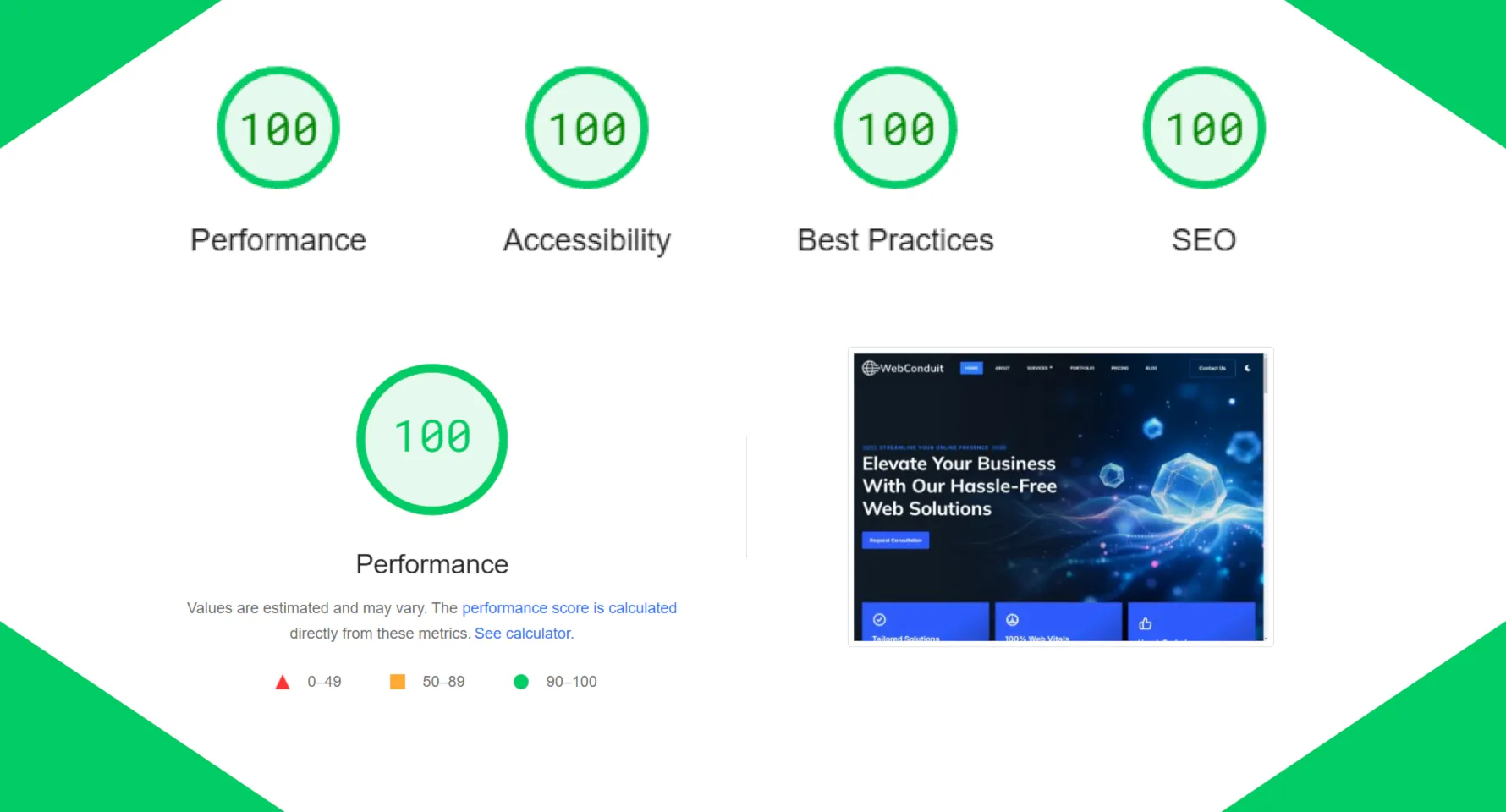
Good developers talk about image optimisation, asset budgets, clean markup, server-side rendering, or static delivery. They should mention tools like Google PageSpeed Insights and explain their process for hitting performance targets. At WebConduit, we guarantee a 98+ Performance score and perfect 100s in Accessibility, Best Practices, and SEO on PageSpeed Insights. That's not something you achieve by hoping for the best: it requires deliberate choices at every stage of the build. Speed affects conversions, SEO, accessibility, and how trustworthy your business feels. Google's own research shows that 53% of mobile visitors leave if a page takes more than three seconds to load.
Do you test Core Web Vitals?
Core Web Vitals are Google's key metrics for page experience: Largest Contentful Paint (LCP), Interaction to Next Paint (INP), and Cumulative Layout Shift (CLS). A serious developer will test these and explain what they mean for your site. We've written a detailed guide on understanding Core Web Vitals if you'd like to learn more. These metrics directly affect your search rankings and user experience. Sites that ignore them tend to rank lower and convert worse.
What does a "fast" site mean to you?
Specifics matter. A vague "we make sites fast" isn't enough. Ask for load time targets, performance scores, or examples of past work. Without clear benchmarks, "fast" is meaningless. You want a developer who can show you what good looks like.
How do you prevent plugin bloat?
If the developer uses a platform like WordPress, ask how they decide which plugins to use and how they manage updates and conflicts. Hand-coded sites avoid this problem entirely by not relying on plugins at all. Every plugin adds code, scripts, and potential security holes. Too many plugins slow your site down and make it harder to maintain.
Question 4. How Do You Handle Accessibility and Compliance?
This is about professionalism, legal awareness, and building sites that work for everyone. Accessibility used to be seen as a nice-to-have, something you'd think about later if you had time. That's no longer the case. UK and EU regulations now require websites to meet strict accessibility standards, and the penalties for non-compliance are real. But beyond the legal side, accessible sites are also better sites: easier to use, better for SEO, and open to a wider audience. These questions help you figure out whether the developer is building accessibility in from the start or planning to retrofit it later (which is always more expensive and less effective).
How do you test accessibility?
A serious answer includes audits, keyboard testing, contrast checks, screen-reader reviews, and keeping up with UK and EU requirements like WCAG 2.2 AA and the European Accessibility Act (EAA). Accessibility protects both your customers and your business. It's also increasingly enforced by law. The EAA came into force on 28 June 2025, meaning UK businesses doing business in the EU must now meet strict accessibility standards. We've written about this in our post on the EAA and what it means for UK businesses.
Do you follow WCAG guidelines?
WCAG (Web Content Accessibility Guidelines) are the international standard for accessible websites. The current version is WCAG 2.2, and Level AA is the baseline most regulations require. A good developer should be familiar with these guidelines and build to them by default. Sites that don't meet WCAG standards can face legal challenges, lose customers, and rank lower in search results.
Will my site have an accessibility statement?
An accessibility statement explains how your site meets accessibility requirements and who to contact if someone has trouble using it. It's a legal requirement under the EAA for businesses operating in the EU. It shows you take accessibility seriously and gives users a clear route to report issues.
How do you handle upcoming regulations?
A developer who stays informed about changing standards and proactively updates sites to meet new requirements is what you're looking for. At WebConduit, our all-in-one package includes automatic updates to keep your site compliant as regulations evolve, with no extra fees. Retrofitting accessibility later is far more expensive than building it properly from day one. You want a developer who's already thinking ahead.
Question 5. Who Owns What, and What Happens If Things Go Wrong?
This is about stability, control, and making sure you're not locked into something you can't get out of. Your website is a business asset, and like any asset, you need to know who owns it, where it lives, and what happens if things go wrong. Some developers are transparent about this. Others bury the details in contracts or make assumptions that aren't in your favour. These questions help you avoid nasty surprises and make sure you're not handing control of your business to someone who won't give it back.
Who owns the code and domain?
This varies depending on the service model. For one-off projects, you should own everything once the work is paid for. For subscription models, it's more nuanced. At WebConduit, our Website Design and Development service gives you full ownership of the code once the final payment is made. Our All-In-One Website Package retains ownership of the design while you're subscribed, but you can buy it out after the 12-month minimum term if you want to move elsewhere. What matters most is that the terms are clear upfront and you're not trapped. You should always own your domain, your content, and anything you provided (like photos, logos, or text). Be wary of developers who claim ownership of materials you created or who make it difficult to leave.
Where is the site hosted?
The developer should explain where your site lives, who manages the hosting, and whether it's included in your package or billed separately. Hosting affects speed, security, and reliability. Cheap shared hosting can drag performance down. Good developers use cloud hosting or managed services that can handle traffic spikes and deliver content quickly.
How are backups handled?
Automatic, off-site backups that are tested regularly are what you're looking for. Ask how often backups run, where they're stored, and whether you can restore one yourself if needed. A backup you can't restore is just a comforting illusion. When something goes wrong, you want to know your site can be recovered quickly.
What happens if you stop working together?
Clear exit terms are essential. Can you take your site elsewhere? Will you get the files? Is there a handover process? Avoid contracts that make leaving expensive or complicated. A good developer will have a simple, fair exit path. Business relationships change. You want to know you can move on without losing everything you've invested.
Question 6. What Happens After Launch?
This is about long-term partnership, not just launch-and-run. A lot of developers are great at building sites and terrible at maintaining them. The site launches, looks good, and then slowly starts to degrade: plugins go out of date, backups stop running, security holes open up, and performance drifts downwards. By the time you notice, fixing it is expensive. Good developers plan for the long term from the start. These questions help you figure out whether the developer is in it for the quick win or actually cares about keeping your site running smoothly for years.
What happens after launch?
A good answer talks about monitoring, regular updates, performance checks, and a clear point of contact for when things go wrong. Websites decay without care. Regular maintenance prevents emergencies, downtime, and the slow creep of technical debt. We cover this in detail in our website maintenance checklist.
Do you offer maintenance plans?
Many developers offer ongoing maintenance as an add-on or built into their pricing. Ask what's included: security updates, backups, content edits, performance monitoring, or troubleshooting. At WebConduit, our all-in-one package includes everything: hosting, backups, security updates, unlimited text edits, and ongoing support for one monthly fee. Knowing what's covered (and what costs extra) helps you budget properly and avoid surprises.
How are updates handled?
A clear process for updating plugins, themes, or core software is essential. The developer should explain how they test updates before applying them and what happens if something breaks. Outdated software is one of the most common ways sites get hacked. But blindly updating everything can also break things. You want a developer who manages this carefully.
What's your response time for issues?
Realistic commitments matter. Same-day responses for emergencies, a few days for non-urgent fixes. Anything vague like "we'll get back to you when we can" isn't good enough. When your site goes down or a form stops working, every hour costs you money. You need to know someone will respond quickly.
Question 7. How Do You Handle Pricing and Scope?
This is about professionalism over bargain-basement deals and avoiding nasty surprises. The cheapest quote isn't always the best value, especially when it turns out to be vague about what's included or comes with hidden fees that only show up later. Good developers are upfront about what things cost, what's covered, and what isn't. They give you proper proposals, clear terms, and honest answers about ongoing costs. These questions help you spot the developers who price fairly and transparently versus the ones banking on confusion and scope creep.
What exactly is included in the price?
An itemised breakdown is essential: design, development, hosting, domain, backups, content edits, ongoing support. Everything should be listed clearly. Vague quotes lead to scope creep and surprise invoices. You want to know exactly what you're paying for.
What counts as a change request?
Clear definitions matter. For example, at WebConduit, our unlimited text edits mean you can change the words on your site whenever you like. But adding a new page or changing the layout would be outside that scope. Misunderstandings about what's included are one of the most common sources of friction. Get it in writing upfront.
Will I get itemised proposals?
Yes. A professional developer should give you a written proposal that breaks down deliverables, timelines, and costs. It protects both sides. You know what you're getting, and the developer knows what they're responsible for.
Are there ongoing fees?
Transparency about recurring costs is essential: hosting, domain renewals, maintenance plans, or subscription fees. Make sure you understand what stops if you cancel. A £1,000 one-off website that costs £100/month in hidden fees adds up quickly. Know the full picture before you commit.
Question 8. What's Your Experience and Process?
This is about maturity, repeatability, and whether the developer has done this enough times to know what can go wrong. Anyone can build a website once. Building them consistently, on time, and without drama takes experience and systems. Developers who've been through the process dozens of times have learned what works, what doesn't, and where the problems usually show up. They've built workflows to prevent chaos, and they know how to handle things when timelines slip or requirements change. These questions help you figure out whether you're dealing with someone who's still figuring it out or someone who's already learned the hard lessons.
Can you explain your build process?
A clear workflow is what you're looking for: discovery, design, development, testing, launch, and handover. The developer should be able to walk you through each stage and explain what you'll be asked to provide. A documented process signals experience. It means the developer has learned from past projects and built systems to prevent chaos.
Who will I actually be working with?
Names, roles, and who your main point of contact will be should be clear. If it's an agency, ask whether you'll work with the same person throughout or get passed around. Knowing who you're dealing with helps build trust and keeps communication clear.
How do you test before launch?
A proper QA phase that includes cross-browser testing, mobile testing, form submissions, page speed checks, and accessibility audits is essential. Sites that skip testing often launch with broken features that could have been caught earlier.
What happens if something slips?
Honesty is key. Timelines can shift for legitimate reasons. A good developer will communicate early if there's a delay and explain what's being done to get back on track. Transparency when things go wrong is a better indicator of professionalism than a perfect record.
Final Thoughts
The best web developers aren't trying to hide how they work. They're happy to explain their process, show you examples, and answer awkward questions about ownership, maintenance, and what happens if things go wrong.
If a developer dodges these questions, gives vague answers, or makes you feel like you're asking too much, that's your signal to keep looking. The right developer will treat these conversations as part of building trust, not an inconvenience.
At WebConduit, we hand-code every site we build, guarantee performance scores of 98+ on PageSpeed Insights, and handle everything from design and hosting to ongoing maintenance. Whether you're looking for a one-off build or a fully managed package with unlimited edits and a free redesign down the road, we're happy to talk through what that could look like for your business.
If you'd like to ask us any of these questions (or your own), get in touch! We'll give you straight answers and help you figure out what makes sense for where your business is now and where it's going.
Contact Us